Heuristic UX Audit
A heuristic accessibility audit of Bookbibuli, a children's reading platform. Uncovering how hidden assumptions in form logic silently exclude real users, and how a JavaScript-only architecture blocks access for everyone who relies on assistive technology. FINDINGS: Eight issues were identified and prioritised by severity and user impact. The two critical findings were structural as in they affect every user on every page, and they interact directly with accessibility. WHAT I EVALUATED: I structured the audit across five flows - New user onboarding, Content discovery, Reading Experience, Account management and Accessibility evaluation against WCAG 2.1 AA - each assessed against Nielsen's 10 heuristics.
Client:
Bookbibuli
Role:
Accessibility auditor
Year:
2026 (6 weeks)
Starting with who this platform serves
Bookbibuli is a reading platform built for children, used by parents and educators. Its core promise: "Make your child a reader", implies a product that needs to work for everyone in that ecosystem: children of varying reading levels and abilities, parents across a wide range of technical literacy, and educators managing multiple student accounts.
What the audit surfaced
Critical: JavaScript-only rendering. Blank page without scripts.
Critical: Screen reader incompatibility. No focus management on route changes.
High: No value proposition. New users cannot determine who this is for.
High: Book catalog has no age labels, reading levels, or filters.
Medium: Off-platform podcast content breaks the reading context.
Spotlight finding: The form that decided who you are
During the sign-up flow, I noticed something unexpected. Typing in the age field was dynamically changing another field elsewhere in the form. I tested it systematically.
The behavior is this:
Enter any age below 18, and two fields below transform to "School" and "Standard."
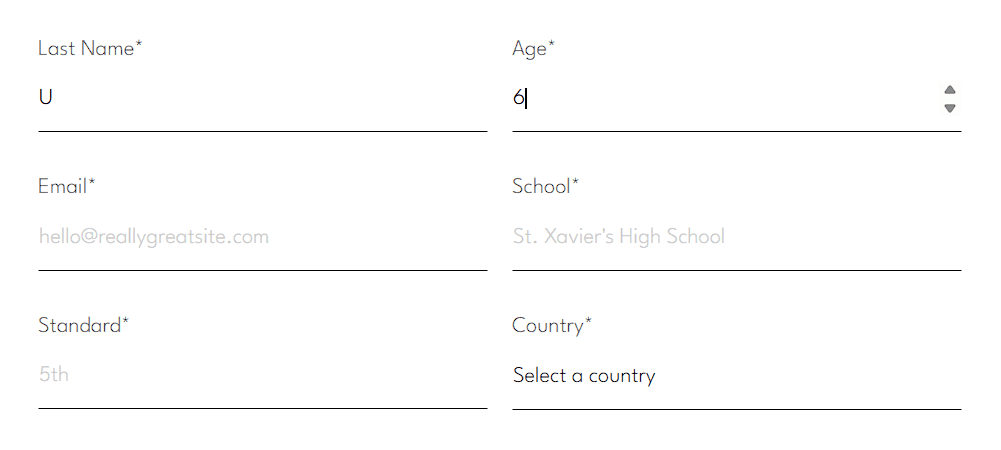
Enter 18 or above, and those fields become "Profession." The logic is technically functional. The problem is what it assumes.
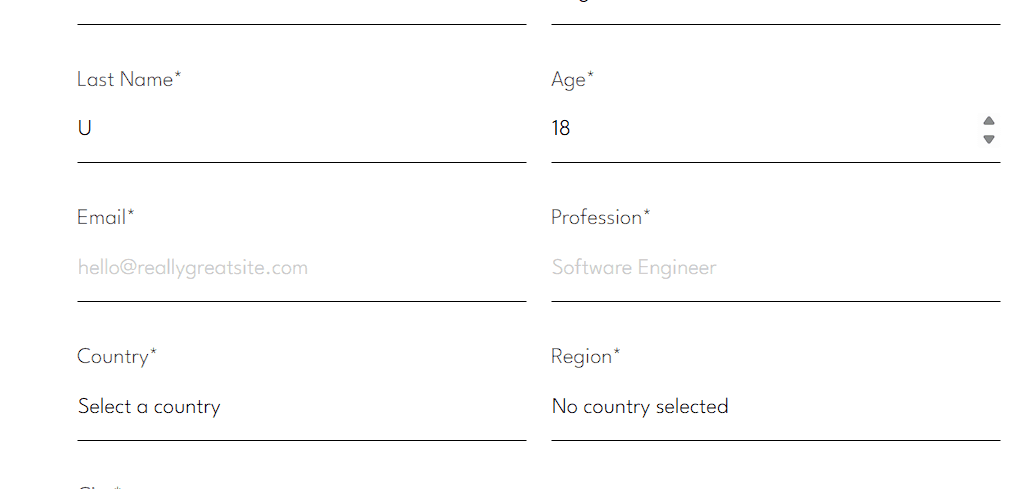
From an inclusive design perspective, this matters because the platform's primary adult user is a parent or guardian — a group that includes many people who are not currently employed. A stay-at-home parent managing a child's Bookbibuli account should not be forced to misrepresent themselves in a sign-up form because the form has no category for their reality.
Inclusive design requires actively asking "who are we not thinking about?" at every decision point, especially in gating flows like registration.
What I recommended: Replace the age-triggered profession/school binary with a single "your role" field that captures the user's actual relationship to the platform: Parent or Guardian, Student, Educator, or Other. This removes the employment assumption entirely, captures more useful data for personalisation, and signals to users that the platform was designed with their actual circumstances in mind.
Five changes, ordered by impact
Implement server-side rendering for all core pages
Replace the profession/school binary with an inclusive role selector
Add reading level labels and age filters to the book catalog
Conduct a full WCAG 2.1 AA audit with assistive technology
Design an accessible, personalised onboarding flow
What I would do next: Recruit 3-5 parents of children with reading differences for a 30 minute moderated usability session. Pair this with a screen reader walkthrough using NVDA. The combination of lived experience and assistive technology testing would surface barriers this audit could not reach through heuristic evaluation alone.